The purpose of the Journal is to disseminate knowledge, experience, and best practice in engineering & manufacturing. The articles are written by practicing professionals in the Engineering City (EC) in Yerevan. They cover issues relevant to their projects, operations, and organizations. The articles address the challenges of the time. As such, the Journal is also a chronicle of the evolution of the EC, its companies, and its individuals. It is the aim of the Journal to advance the engineering & manufacturing practice, to enrich the engineering & manufacturing community, and to contribute to the worldwide discourse in engineering & manufacturing.
Published by the Engineering Association
The Engineering City JournalIssue 19/2025Published by the Engineering AssociationYerevan, October 15, 2025
by Ashot Arzumanyan, 11th-Grade School Student interning in the EC
English translation
Handling BOM files when starting a new project takes much time and effort. Those have to be checked to contain all the required data to successfully undertake the procurement stage. This is why this project was started.
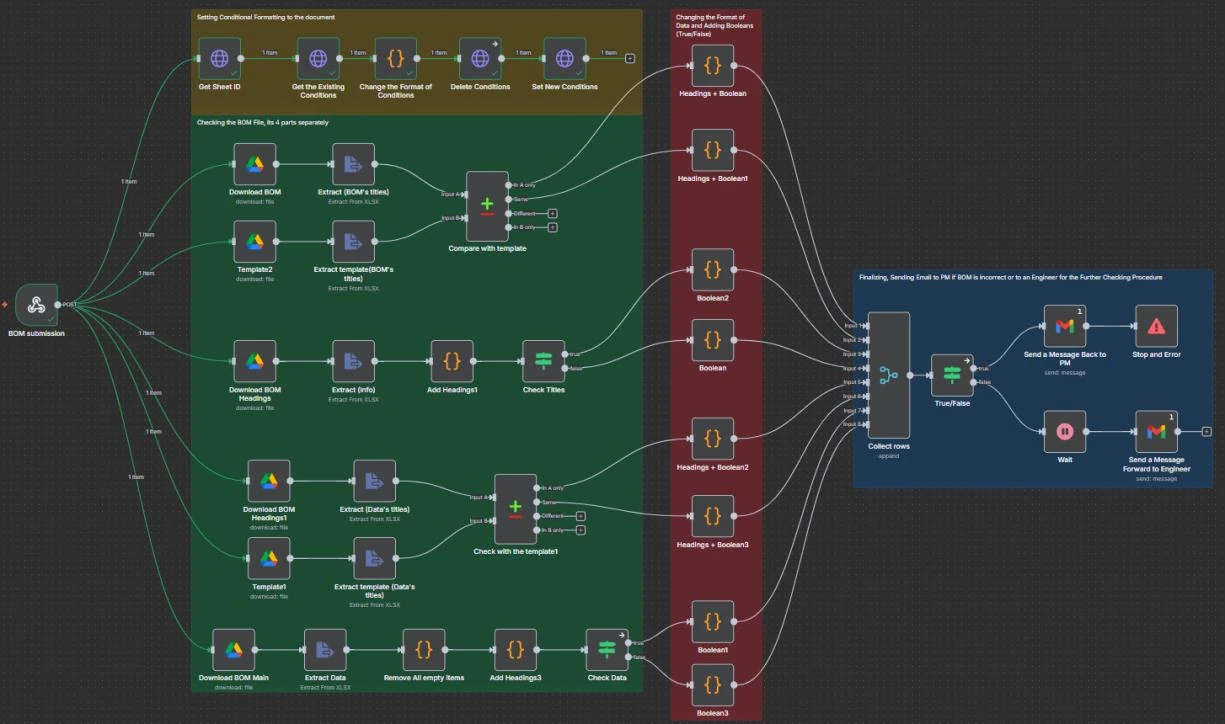
Below you can see the workflow created via n8n, which automatically checks if the BOM is properly structured and meets all the requirements.
Figure 1– Workflow from Start to End
So, let’s start with the trigger. The workflow is triggered (set into motion by a specific action/condition) by a form submission. You can see it below.
Figure 2 – BOM Submission Form
As this form is submitted, the workflow automatically activates. It checks if the BOM submitted matches the template. Below you can see the Template (Figure 3) and the Example of the BOM (Figure 4).
Figure 3 - TemplateFigure 4 - Example of the BOM Submitted
This is done in 4 stages, and is divided into 2 parts (check of the template and check of the data):
Stage 1. The BOM titles are being checked (top 2 rows) (see Figure 5).
Stage 2. The titles of the columns for the data are being checked (5th and 6th rows) (see Figure 6).
Figure 5 – BOM Title Check Figure 6 – Data Column Title Check
Then, the workflow verifies the info that is inside the file.
Stage 3. Checks BOM titles’ fields to be filled, all the required data received (see Figure 7).
Stage 4. Checks if the main data can be considered as complete, where components of the BOM are presented (see Figure 8).
Figure 7 – BOM Title CompletenessFigure 8 – Main Data Completeness
All the rows are checked not to be empty (to be filled). Additionally, some fields have to be filled in a specific form, so it also considered these conditions. For example, Project ID should start with “PI-“, or QTY should be a number. If one is empty, or does not meet the requirements, the BOM will not pass the verification process.
Afterwards, all items (rows of the document) are going through the checking process, they are given true value if they passed and are flagged as false if not (denoted by a red color background (see Figure1)). These are collected together and divided into groups: true and false. Firstly false branch is being executed. If there are any false items, an email is automatically sent back to the project manager, in order to resolve the issues and re-submit the BOM. Then, the workflow stops (see Figure 9).
If there are no false items, true branch is executed, which acts to send an email to an engineer, who should submit that this is the correct BOM (see Figure 9).
Figure 9 – Workflow End
If all is correct, the following form is being sent to the engineer via same email:
Figure 10 – Submission form for Engineer
This process is denoted by a blue color on Figure 1.
However, it may be difficult to find where the problem occurs within a big BOM file, to resolve it. That is why this workflow acts to graphically show problematic cells by changing their background color to red.
This is done in a separate branch (see Figure 11). It is done in a multiple steps using HTTP request to the BOM file. The workflow automatically gets spreadsheet ID and sheet ID to access the file, then it deletes all already existing conditions and formats, and with the next node puts new ones, that act to change the color of fields within the document.
Figure 11– Setting Conditional Formatting to the Document
See example of how this works below:
Figure 12 – Data Formatting Example
So, using this feature it will become easier and faster for a Project Manager to see where the problem arises and resolve it.
Finally, this is just a small part of what should be automated. However, even this tiny piece of automation is already likely to increase productivity, effectivity and efficiency of processes within YEA Engineering and contribute to its further success.
Industry-Based Talent Development System (IB-TDS)
AI in Engineering Education
by Grigor Shirinyan, DigiCore
English translation
Introduction
Context. Our high-school students already know the basics of electronics, software, and prompt engineering. Instead of using AI as an answer machine, we’ve built a program where AI was a process partner across two groups:
Group A — Embedded ML on constrained hardware.
Students deploy ML logic on Arduino (Uno, Nano, Pro, Mega) and ESP boards with very different CPU/RAM/flash profiles.
Group B — Local AI on messengers. Students run private, local models whose responses are delivered through WhatsApp, Telegram, and Viber bots.
What follows is the approach, not just the outcomes. It’s meant to be replicable and different from typical “AI in education” write-ups: we grade process evidence, insist on explainability, and use AI to help optimize algorithms so they can run effectively on limited hardware.
Principles we Use
Trainer as sense-maker, not oracle. The trainer does not deliver facts; they teach how to figure out how something works.
The 85% rule. If a student understands <85% of what they built, they must use AI to generate explanations and then teach back the mechanism to the trainer.
Explain-to-Run policy. Code can be flashed/deployed only when accompanied by a brief mechanism note: what it does, why it fits the device, how we’ll test it.
AI is iterative, not one-prompt. Students move through idea → options → selection → implementation → debugging → reflection.
Local-first by default. Whenever possible, models run on- prem/on-device; bots just transport messages.
Group A – Embedded ML on Arduino/ESP
Projects
Traffic control: sensor fusion to switch lights based on real traffic patterns.
Object recognition / classification: constrained pipelines (e.g., feature-based or tiny CNN variants) sized to MCU limits.
Statistics: rolling averages, anomaly flags, and thresholding for sensor health.
Algorithms Used
Students experimented with lightweight machine learning algorithms such as logistic regression, k-means clustering, and tiny convolutional neural networks (tiny CNNs). The choice depended on the
device constraints: simpler algorithms for boards with very limited memory (Arduino Uno/Nano), and slightly more complex ones for more capable hardware like ESP boards.
Workflow that Students Follow:
Hardware decision matrix. With AI, students score boards on RAM/flash, cycles per inference, latency, energy, and library support. They must justify why Uno vs Mega vs ESP, and why not the others.
Setup & circuits. AI helps draft schematics and sanity checks pin maps, power budgets, and protection (resistors, diodes).
Programming.
Students author code first; AI is used to port (e.g., Python → C/C++ for Arduino) and to check compatibility with toolchains.
AI proposes memory-safe revisions (buffers, stack/heap limits) and identifies hot loops for micro- optimizations.
Debug Diary. Every upload requires a short log: symptom → hypothesis → test → change → retest.
Deployment & validation. Students attach timing/memory numbers (e.g., loop time, stack usage, FPS, inference latency) and a simple accuracy/false- positive report.
What’s different: We treat device constraints as a teacher. Students learn algorithmic tradeoffs (precision vs latency vs memory) because the board forces the conversation.
Group B — Local AI on WhatsApp/Telegram/Viber
Architecture (student-operated)
A local model (e.g., on a lab server) generates responses.
Bots on each platform handle transport; logs omit PII by design.
Students implement rate limits, retries, and basic monitoring.
The learning problem we saw
Prompt-savvy students can “find” solutions quickly—but don’t always grasp why they work. Our answer is a structured, multi-step flow with comprehension gates:
Idea. Students ask AI for multiple approaches and list trade-offs.
Selection. With AI, they choose the most appropriate path (criteria: complexity, cost, privacy, maintainability).
Implementation a. Libraries. Discover, install, and explain key APIs.
b. Platforms & environments. Configure WhatsApp/Telegram/Viber integrations. Document tokens, webhooks, and security c. Uploading & running. Wire the bot to the local model. Dry-run with test users.
d. Debugging with AI. Use the model to form hypotheses, not just paste errors.
e. Documentation. Produce a flowchart and a short “how it works” explainer.
f. Optimization. Profile response time and memory; trip context windows; cache frequent intents. g. Monitoring & rollback. Basic dashboards, error alerts, and safe fallbacks.
What’s different: We grade the explanation artifacts (concept map, flowchart) and the operational reality (latency, reliability), not just whether the bot “answers.”
Assessment that Rewards Real Understanding
We don’t just grade whether the project “works.” Instead, we check how well students understand what they did:
Process work (40%) – Students must show the steps they took: the hardware decision matrix, Debug Diary, explanation notes, and flowcharts.
Oral explanation (20%) – Each student gives a short 3- minute talk (like a mini defense) where the trainer asks questions to test their understanding.
Device performance (20%) – We measure things like memory use, speed, and accuracy on the actual hardware.
System reliability (20%) – For the messaging projects, we check how well the system runs: Are responses fast? Do they work most of the time? Can it handle errors?
Students are free to use AI—but they must own the reasoning. If AI writes code, the student explains it. If AI gives an explanation, the student checks and proves it’s correct.
What we learned (and where the innovation actually is)
From answers to models. Students stop asking “What’s the code?” and start asking “What’s the model behind the behavior?”—for software and hardware.
Cross-language fluency. Writing in a familiar language and using AI to port to C/C++ for microcontrollers reduces fear of low-level work while preserving rigor.
Failure becomes data. The Debug Diary normalizes hypothesis-testing over trial-and-error.
Trainer time shifts to thinking. Less lecturing about APIs; more coaching on decision quality and mechanism understanding.
Risks & Mitigations
Over-reliance on AI. Mitigated by Explain-to-Run and the viva.
Optimization challenges. Students may initially struggle to make algorithms efficient on limited memory and processing power. We address this by guiding them to use AI for code optimization and performance tuning.
Hardware safety. Current-limiting, correct power rails, and protective components are non-negotiable.
Shallow debugging. Debug Diary rubric penalizes “worked after paste” without hypotheses
Learning Beyond Memorization (why this matters)
Thanks to AI, students learned not to memorize material mechanically but to understand and explore the concepts necessary for their projects. At this stage of education, the role of the trainer is not to simply explain
“how something works” as a fact, but to guide students in discovering how to understand how things work. Students who use AI in their learning process become more confident and independent, which is a highly valuable quality for future employers. When they go on internships or enter companies, mentors and managers will not have to “spoon- feed” them for long — they will already be capable of learning and problem-solving on their own.
Why High School
It is important to note that applying AI in this way is logical and beneficial for high school students, not younger learners. Before engaging with AI-driven projects, students need to first master the fundamentals of electronics, programming, and problem-solving. Only once they have this foundation can AI become a meaningful tool—helping them design, test, and optimize—rather than a shortcut that replaces learning.