The purpose of the Journal is to disseminate knowledge, experience, and best practice in engineering & manufacturing. The articles are written by practicing professionals in the Engineering City (EC) in Yerevan. They cover issues relevant to their projects, operations, and organizations. The articles address the challenges of the time. As such, the Journal is also a chronicle of the evolution of the EC, its companies, and its individuals. It is the aim of the Journal to advance the engineering & manufacturing practice, to enrich the engineering & manufacturing community, and to contribute to the worldwide discourse in engineering & manufacturing.
Published by the Engineering Association
The Engineering City JournalIssue 23/2025Published by the Engineering AssociationYerevan, December 29, 2025
Many of our companies in the EC have PhD students on their staff. But it has been my observation that rarely do these students do research for the companies that they work for. Instead, their topics are defined by the professors in the universities.
But this is a pity and a loss of opportunity.
PhD students in engineering do future technology research. Future technology research should become the core of new products for the companies where they work.
Companies must collaborate with university professors in defining the research projects for the PhD students.
Otherwise, these will be lost opportunities for the companies.
Popularizing N8N
Automating the BOM Submission Process to Procurement – v3 and Final
by Ashot Arzumanyan, 11th Grade School Student interning in the EC
We keep improving the workflow that automates BOM submission process. See current full workflow on the picture below (see Figure 1). Visually, it has changed a lot, but actually, the logic remains the same.
Figure 1– Parent Workflow
In this step we have resolved several issues related to effective time management and data verification, made the workflow to undertake more difficult tasks, and worked on the readability of the workflow.
So, this version of the workflow looks much easier than the one from the previous article. Here, we have used Sub-workflows. These are separate workflow within the bigger one. Sub-workflows on Figure 1 are nodes with the icons as shown on Figure 2.
Figure 2 – Sub-workflow Icon
Now, each Sub-workflow (icon as shown on Figure 2) is a part of the workflow of in the previous version. We will get back to this later.
Problem 1: the BOM of the project may contain up to 15 Sub-systems (sub-BOMs), which all are in separate files (these are under the same Project ID), so all of these have to be processed by the workflow. This causes another problem:
Problem 2: Project ID is the base of the info processed by the workflow, so, we have to ensure that the correct Project ID is being submitted.
Firstly, the common thing between the sub-systems is that they refer to the same project (Project ID is the same). Therefore, Project ID is likely to be taken as a base for undertaking this task. So, we started with creating a database of Project IDs in the same Google Sheets spreadsheet (see Figure 3(a), (b) and (c).
Figure 3(a) – Project ID DatabaseFigure 3(b) – Project ID Database
The maximum number of sub-systems is 15, so this database comes until sub-system 15.
Figure 3(c) – Project ID Database
As you can see on Figure3(c), not all projects have 14 or even 15 sub-systems, that is why some fields are empty.
The database is partly filled before submitting the BOM, Figure 3(a) shows all these cells.
Now, based on this database, we can create the BOM submission form.
Figure 4– Updated Page 1 of the Submission Form
The Project ID database allows to create a proper BOM submission form. In order to avoid submission of not existing Project ID, we’ve added a Project ID field (see Figure 4), which gives a dropdown list of active IDs and a project name for each to make it easier to find the needed one. This step fulfils the following functions:
a. It makes it impossible to submit a Project ID that does not actually exist; b. Lists only “Active” IDs, which means that only IDs of current projects can be chosen(here we assume that there are only 2 possible statuses “Active” and “Finished” for simplicity); c. Reduces time that a worker spends on the BOM submission, causing less stress;
A project manager fills the required inputs and moves to page 2.
Figure 5 - Updated Page 2 of the Submission Form
Page 2 (see Figure 5) contains auto-filled data about 2 workers and a Project ID, hence, allowing a project manager to check the data submitted, and, provides inputs for sub systems. There is now an additional field, which asks “How many Sub Systems are there?” giving a dropdown list from 1 to 15. As you can see on Figure 5(a), we’ve chosen 1, so we have to provide data about 1 sub-system (i.e. each sub-system has 4 fields). This data is then sent to the Project ID database (see Figures 3(b) and (c)).
However, now the format of the data that is being submitted changed. So, the database of submissions should be changed (see Figure 6(a), (b), (c), (d)).
We’ve added a “Status” column (see Figure 6(a)), “Personal/Engineer Manager’s Full Name/Email” (the purpose will be discussed later) (see Figure 6(a), (b)), Number of Sub-systems, Sub system Links and a unique ID, generated automatically when submitting a form, for each link, and “Reminder Sent at” column, which will be also explained below (see Figures 6(c), (d)).
Then, though only “Active” Project IDs can be chosen, there is still a risk that Project ID chosen when submitting form or the one written in the BOM is incorrect. In order to minimize the threat of wrong Project ID being submitted, Check the PID with the BOM sub-workflow was created (see Figure 7).
Figure 7 – Check the PID with the BOM
This sub-workflow is called ‘’Check the PID with the BOM” on the parent workflow (see Figure 1). This sub-workflow is executed before the “Loop over Items1” algorithm (see Figure 1), it has its own “Loop over Items” algorithm (see Figure 7). This part is executed before the rest of the workflow, separately, since it should not allow the execution of other nodes if the sub-system(s) fail to pass this test.
Briefly, this part of the workflow compares Project ID submitted via submission form and the Project ID written in the BOM (each Sub-system), so ensuring that a correct ID has been submitted. If not, the row of this submission, in the Submission database, should be deleted, as the input data is invalid.
Logic per node:
“When Executed by Another Workflow”: parent workflow triggers the sub-workflow and send data.
“Leave only Sub Systems”: gets only sub-systems for future data procession.
“Loop Over Items”: checks each separate sub-system separately.
“Extract File ID”: extracts spreadsheet ID of the file.
“Download file”: downloads the file according to the spreadsheet ID.
“Heading Data”: this node simply extracts the data, with the Project ID, from the BOM file.
“Compare Project IDs”: checks if the project ID submitted and the project ID of a certain sub-system match. a. True Branch: “Set TRUE”: the node sets TRUE value to the spreadsheet ID if it matches. b. False Branch: “Set FALSE”: the node acts to set FALSE value if the spreadsheet does not match.
“Merge”: gets the value, whether it’s TRUE or FALSE.
“Loop Over Items” (done branch): collects all the values for all spreadsheet IDs.
“Keep only Mismatches”: leaves only those spreadsheet IDs that got FALSE value.
“Get row(s) in sheet”:
“Get row(s) in sheet1”: the node starts the logic of deleting an invalid row. This node extracts all submissions from the database for the further procedures.
“Last Submission per ProjectID1”: we need to leave only the last submission per Project ID to delete the needed one, as otherwise, we may delete submission with the same Project ID, which matches the one from the BOM.
“Leave only submitted PID”: with this node we keep only the current submission with invalid Project ID input.
“Delete incorrect PID row”: deleted the row of the submission from the Submissions database.
“Send a TG message to PM”: sends a telegram message to the project manager to inform that submission was not accepted because of the mismatching Project IDs.
“Send a message to PM”: informs a project manager about the mismatch via email.
“Mismatching Project IDs”: throws an error and stops the whole workflow.
Then, if the project ID testing procedures are successfully passed, the workflow continues its execution.
Since several sub-systems are being submitted and each one should be checked, we use the “Loop over Items1” node, which acts to complete the workflow separately for every sub-system (see Figure 1).
So, each sub-system is being converted and copied to the Google Sheets format (see Figure 8):
Figure 8 – Convert BOM to GSheets/Copy BOM Sub-workflow
So, the node called “Convert BOM to GSheets/ Copy BOM”, coming within “Loop over Items1” algorithm (see Figure 1), is basically, the first part of the previous version of the workflow (see Figure 3). This workflow is being triggered by the parent (main) workflow and executes as its part. The same refers to the rest of the sub workflows.
Then Conditional formatting is set (see Figure 9):
Figure 9 - Set Conditional Formatting
After, sub workflow ae being check to meet the template requirements (see Figure 10):
Figure 10 - Checking the BOM
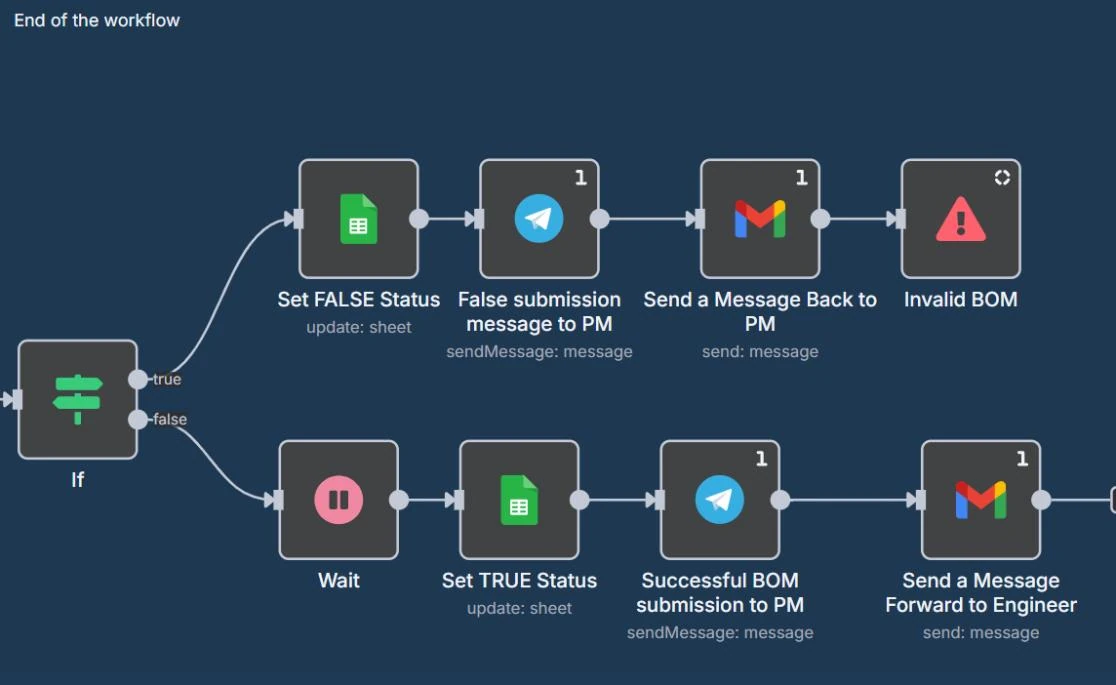
After all the sub-systems have passed Project ID and template tests, the workflow should end, by denoting the status of the submission, and informing project manager (or whoever responsible for the form submission) whether it was successful and a TRUE status is set within the Submissions database, or he/she should correct sub systems and re-submit them. Then, FALSE status is set (see Figure 11). Denoting TRUE and FALSE values will allow us to successfully undertake the next step.
Figure 11 – End of the Workflow
Problem 3: the process of an engineer re-submitting invalid BOM may take much time or he/she may even forget about it.
So, we’ve denoted TRUE and FALSE submission to make the re-submission analysis easier.
As you can see on Figure11, Telegram messages were also added to the workflow. This is done in order to ensure higher effectivity, as if an employee may overlook an email, with Telegram this is likely to happen less frequently, hence, partly resolving Problem 1.
In order to minimize the impact of this simple operation on effectiveness and efficiency, a separate reminder workflow has been created. You can see it below (see Figure 12).
Figure 12– Reminder Workflow
The reminder workflow works with the Submissions document (see Figures 6(a), (b), (c), (d)). It is designed to remind an employee to re-submit the BOM if it’s more than 24 hours since an invalid version was submitted. In case an invalid BOM is not re-uploaded for more than 48 hours, an employee’s manager is reached out to remind his employee to submit the BOM.
Logic per node:
“Schedule Trigger”: this node is set to trigger (execute) workflow every hour.
“Get row(s) in sheet”: this node extracts all currently existing rows from Submissions doc, for further execution.
“Last submission per ProjectID”: this is a JavaScript code, which leaves only the last submission of each row. This is done in order to work with the most resent submission, verifying whether it’s >24 or >48 hours since it has been submitted or not.
“Leave only FALSE status”: the node filters rows in a way that only FALSE submissions (invalid BOM submissions) are processed further, so if no FALSE rows exist, then, it stops.
Then, the workflow is divided into 2 branches:
Branch of rows submitted >24 hours, but <48 hours ago (top branch (see Figure 4)):
“Submitted >24H & <48H + Reminder sent >24H”: another JavaScript code which leaves only those submissions that satisfy these statements: a. Submitted more than 24 hours ago, but less than 48 hours ago; b. Reminder is sent > 24 hours ago, or has not been sent at all. If there are rows, at this stage, that possess these 2 characteristics, then a reminder should be sent each of those.
“Set reminder email Timestamp”: this node accesses Google Sheets Submission doc and fills “Reminder sent at” column for certain rows. This is used to check whether it’s time to send a reminder or not. For example, it’s used in the previous node (i.e. Submitted >24H & <48H + Reminder sent >24H) to check the condition (b), as otherwise a reminder will be sent every hour (i.e. every time the workflow is being executed).
“Telegram message to PM”: this node sends a reminder to a project manager (i.e. an employee that has originally submitted the BOM) via telegram bot.
“Send a Reminder to PM”: an email node sending a reminder to a project manager via email too.
Branch of rows submitted >48 hours ago (bottom branch (see Figure 4)):
“Submitted >48H ago + Reminder email >24H”: a JavaScript code that satisfies the following statements: a. Submission took place more than 48 hours ago.
b. Reminder email was sent more than 24 hours ago. If a row, at this stage, satisfies these factors, it means that project manager has ignored a reminder and it’s time to reach out his/her manager.
“Set reminder email Timestamp1”: as in another branch, this acts to fill “Reminder sent at” column, by parsing the current timestamp. Allows to send reminders at a proper time, not every hour.
“Send a Message to a Manager”: an email node which sends a message to a project manager, encouraging his/her communication with the employee to re-submit the BOM.
“Email to PM about reaching out a manager”: one more email node, which notifies an employee that manager has been reached out to encourage the BOM re-submission.
So, with the introduction of the reminder workflow it becomes barely possible to miss the re-submission, ensuring higher effectivity, efficiency and productivity.
In conclusion, during this step we have ensured that the FALSE BOM/sub-system submission will not be missed or ignored, reminders are going to be automatically sent to an employee and his/her manager.
Moreover, the workflow was designed in a way that it makes the input data, which is the base of the successful workflow execution, to be correct. Hence, it’s contributing to higher effectiveness, efficiency and productivity of the company.
Plus, the readability of the workflow has been improved by exploiting sub-workflows.
Last but not least, we have improved the capability of the workflow, by allowing to submit multiple BOMs/sub-systems for the same project simultaneously.
EC News
Postal Stamp Dedicated to the Engineering City
On December 25, 2025, a stamp dedicated to the "Engineering City" was put in circulation.
The stamp with a nominal value of 380 AMD depicts the Engineering City, as well as the Engineering City logo and the inscription "ENGINEERING CITY" in Armenian and English.
Armenology
The Armenian Church in the Kingdom of Eswatini, Africa
by Rama, EA
Pic.Armenian Apostolic Church in the Kindgdom of Eswatini, Africa.Watch Short Clip here. LINK.
Armenology
Oտար բառերի հայերեն համարժեքներ - 2
From Shirakatsy School’s Language & Literature department.
Armenology
Thoughts on Creating Armenian Equivalents to Scientific and Engineering Words
by Hovsep Shirinyan, NIY
I am very proud we - Armenians - have a unique Armenian language which allows us to survive in the turbulent flow of ages. Although some Armenians were active contributors for the last 2 centuries of science and engineering booming the entire influence of Armenians is very low and the contributors are not always representing Armenia and moreover not acting as drivers of new terminology in Armenian.
I am glad to see there is an initiative to keep the Armenian language clean also in engineering, but sometimes trying to translate everything meaning vise to Armenian brings confusion and hence not representing the entire meaning of the foreign equivalent, especially if the base of that word is internationally adopted one. It is good to have specific wording for the terms while it is coming through the ages and somehow was used by Armenians for their traditional lifestyle.
But there are words - terms which are generally used to represent some specific scientific or engineering meanings and being translated by linguists make them senseless.
Either linguists should work with the industry specialists to create or translate those words. I'll still recommend keeping the international root of specific words to avoid confusion while using in specific professional speech, and that should not be treated as pollution of language.
Good example of Armenian equivalents: Արգանակ, եզրաքար...
Bad examples, especially for engineering content:
Կուտակիչ - accumulator this world can have so many use cases so should be used accordingly
պահոց - archive not every "պահոց" is archive and not every "archive" is պահոց