
Searching for Parts in the Inventory Database using n8n and AI
English translation
AI-Based Warehouse Inventory Analysis System (Warehouse AI)
1. Introduction
This report contains a detailed technical analysis of the Warehouse AI system, designed for intelligent search and provision of information on warehouse stocks of electronic components and other materials. The system combines a web interface, server logic in Python, a database in Google Sheets and a complex workflow on the n8n platform using artificial intelligence agents (AI Agents).
The main task of the system is to replace manual search and help engineers obtain information on the availability and characteristics of components in the warehouse quickly and clearly.
2. System Architecture
The system architecture consists of three key components:
Frontend (Client): Web interface in HTML/CSS/JavaScript (index.html).
Backend (Server): A simple HTTP server in Python (Server.py), which serves the frontend and static data.
Operating logic and AI (Workflow): An automated workflow on the n8n platform (WerhouseAI.json), which processes requests, interacts with the database and generates answers using AI.
2.1. Frontend (index.html)
The frontend is a single-page application (SPA) with a chat interface.
Element Purpose
Webhook
Field for entering the address of the n8n webhook to which requests are sent.
URL
First-level filter (for example, Electronic (SMT), Product). Loaded from
Domain (L1)
/api/domains.
Category
Second-level filter (for example, Resistor, Connector). Loaded from /api/categories.
(L2)
When the engineer enters a request in plain words (for example, "capacitor 100nF 25V,
Input field
package 0805").
Collects the selected filters and the request and sends them as a JSON payload to
Logic
the configured Webhook URL.
2.2. Backend (Server.py)
The Python server (http.server module) acts as a static file server and a simple API for managing filters.
API Endpoint Method Purpose
/index.html GET Serves the main interface file (template/index.html).
API Endpoint Method Purpose
/api/domains GET Returns the list of domains from data/domain.json.
/api/categories GET Returns the list of categories from data/category.json.
/api/domains POST Adds a new domain to data/domain.json.
/api/categories POST Adds a new category to data/category.json.
The server keeps the frontend running and allows the filter lists (Domain and Category) to be updated dynamically without restarting the main AI workflow.
3. The Workflow on n8n
All the main logic of the system is implemented as an n8n workflow, which processes each request from start to finish.
3.1. Data Processing Stages
Stage n8n Node Description
Webhook Entry point. Accepts a POST request at /webhook/inventory-analysis,
1. Input
Trigger containing filters and query.
Extract Extracts and standardizes filters (domain, category) and query from the request
2. Parsing Query
body. Parameters
Load 3. Data Connects to the Google Sheets API. Loads data from the Inventory sheet Inventory Loading Stock of the document. Data
Key stage. Here the domain and category filters are applied. Field names are normalized. The data are sorted:
4. Filtering Filter and
first the items with Total > 0 (those in stock), then by descending and Processing Process Data quantity. Finally, the data are formatted into a text context that will be passed to the AI.
3.2. AI Agent Branches
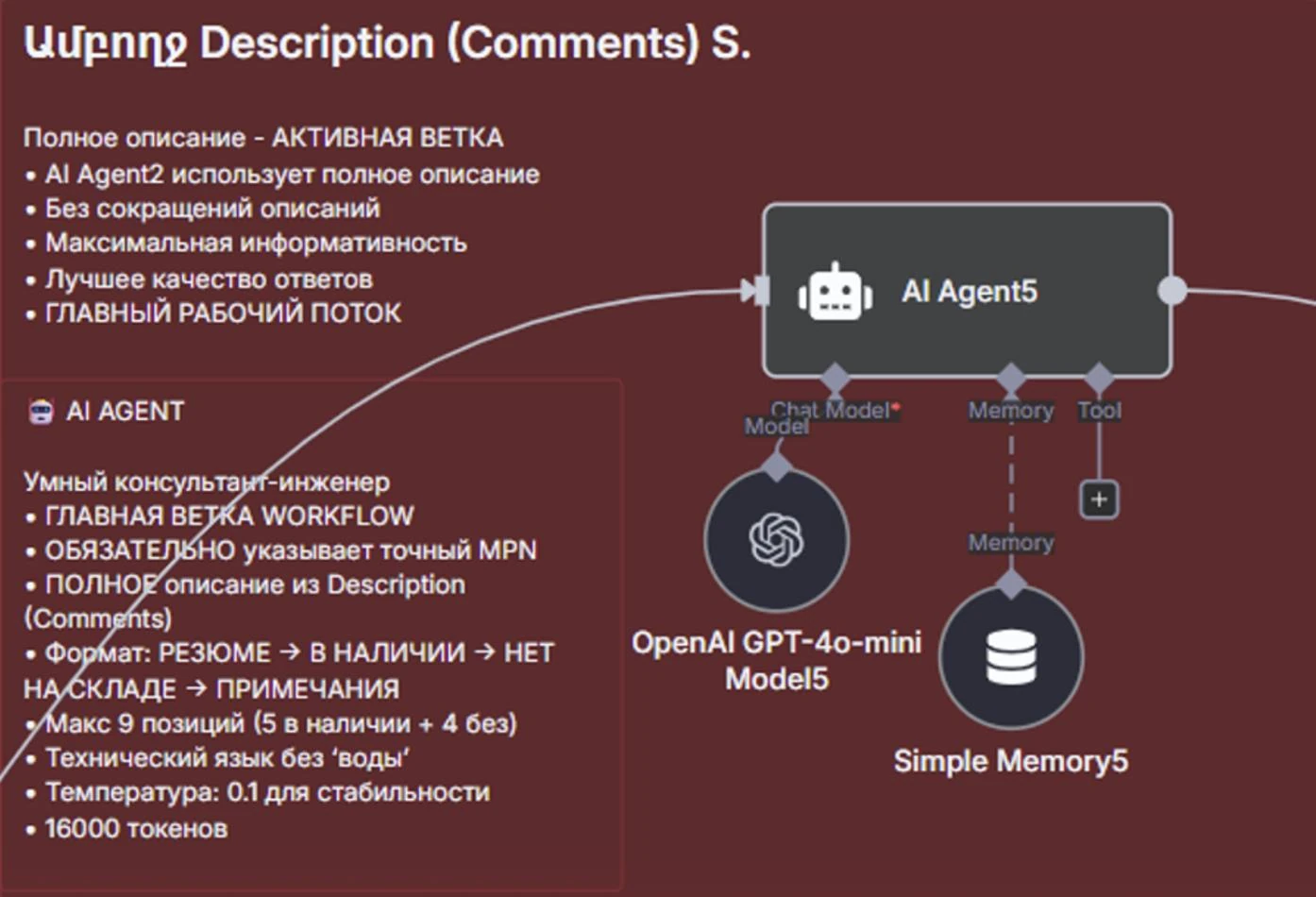
The workflow includes three AI agent branches. At present only one is active, which provides flexibility for testing and future changes.
Name
Branch Status Purpose and Logic
(n8n Note)
Main workflow. Uses the full component description (Description (Comments)). Ամբողջ Response format: SUMMARY → IN STOCK (max. 5) Active Description ACTIVE → OUT OF STOCK (max. 4) → NOTES. (Comments) S. Uses technical language and a temperature of 0.1 for stability. Always states the exact MPN.
MPN և Fallback option. Uses a shortened Alternative ֆիքսված DISABLED description (up to 90 characters). Intended for Disc... M. testing an alternative version of the AI agent.
Experimental branch. Testing without Առանց MPN Experimental DISABLED mandatory MPN and with alternative K. formatting logic.
3.3. Final Processing and Sending
Stage n8n Node Description
Format Single exit point. The response text is extracted from the active AI agent. 5. Final The text is cleaned of Markdown, quotation marks and extra formatting.
Formatting
Response The final JSON object is prepared: {reply: 'response_text'}.
Returns the final JSON response via Webhook Response. Send Sets the required CORS headers (Access-Control-Allow-
6. Sending
Response Origin: *) for interaction with the frontend. Completes the request-response cycle with HTTP status 200.
4. Technical Details and Features
4.1. Context for the AI Agent
The AI agent receives the filtered and sorted data as a structured text context. The data processing ensures that the agent works only with relevant and up-to-date items.
Key fields passed to the AI:
Item MPN (Manufacturer Part Number) Description (Comments) Manufacturer Total (Остаток)
4.2. Strict Response Formatting Rules
To make the response as useful as possible for the engineer, the prompt of the active AI agent strictly limits the response format:
Format: Plain text, without Markdown, tables or quotation marks.
Structure: SUMMARY → BEST MATCHES — IN STOCK → MORE OPTIONS — OUT OF STOCK → NOTES.
Brevity: Each item must be described in one line (up to ~90 characters), focused on key technical characteristics (Pitch, SMT/THT, package, number of pins).
Priority: A maximum of 9 items in total (5 in stock + 4 not in stock).
4.3. Use of AI Models
The active branch uses the OpenAI GPT-4o-mini model with a temperature of 0.1. A low temperature (close to 0) was chosen to minimize "hallucinations" and ensure the most stable and factual answers, which is a critical requirement when working with engineering data.
5. Conclusion
The Warehouse AI system is a highly efficient solution for intelligent access to WMS data. The integration of the frontend, backend and n8n workflow with AI agents turns a complex search of the inventory database into an intuitive dialogue.
Key advantages:
Accuracy: Strict filtering and formatting of the data before they are fed to the AI.
Reliability: Use of the stable GPT-4o-mini model with a low temperature.
Engineering orientation: A response format focused on MPN, availability and brief technical characteristics, ideally suited to engineers.
The system is ready for scaling and further development. In particular, the alternative AI agent branches can be activated and tested to optimize the brevity or format of the response.
Note: Since the answers are generated by artificial intelligence, occasional inaccuracies are possible. Critical data should be double-checked before use in design or production work.