The purpose of the Journal is to disseminate knowledge, experience, and best practice in engineering & manufacturing. The articles are written by practicing professionals in the Engineering City (EC) in Yerevan. They cover issues relevant to their projects, operations, and organizations. The articles address the challenges of the time. As such, the Journal is also a chronicle of the evolution of the EC, its companies, and its individuals. It is the aim of the Journal to advance the engineering & manufacturing practice, to enrich the engineering & manufacturing community, and to contribute to the worldwide discourse in engineering & manufacturing.
Published by the Engineering Association
The Engineering City JournalIssue 21/2025Published by the Engineering AssociationYerevan, November 27, 2025
“Lay Offs” is the act of terminating employees for market reasons.
We all work in the marketplace. “Markets” means free and unrestrained competition, “markets” means constant fluctuations, “markets” means out-of-our-control conditions, “markets” mean unpredictability – especially in VUCA times (Volatile, Uncertain, Complex, Ambiguous).
“Lay offs” is absolutely not the same as firing. “Firings” happen because of bad performance of an individual, whereas “lay offs “ happen because of change in the marketplace.
“Lay offs” are forced on the organization, whereas “firing” is a deliberate act of the organization.
“Lay offs” happen in quantities, meaning that organizations are forced to lay off groups of people at the same time, whereas “firing” is done individually.
In the case of “lay offs”, organizations provide positive reference about the individuals, whereas, in the case of “firing”, organizations tend not to give any reference for the individual.
“Lay offs” is a difficult departure of colleagues and friends, whereas “firing” is a departure of cultural misfits.
“Lay offs” are tragic, whereas “firings” are reliefs.
“Lay offs” is an act of rescuing the organization from collapse, whereas “firing” is an act of securing the organization against collapse.
“Lay offs” weakens the organization, whereas “firing” strenghtens it.
All companies in the EC work in the marketplace hence all are subject to lay-offs at one time or another. But lay offs in one company in the EC must not be as painful. This is because there are many companies that must be able to absorb the laid off people.
As such, lay offs in the EC must not be considered “loss” as long as people stay in the EC community in one company or another.
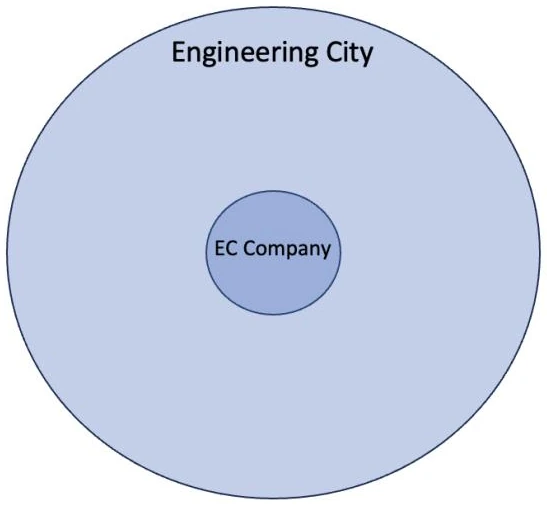
Pic.A Company working in the Engineering City
You may also read the article “Working for the Valley, Working for the City” in the previous edition of the Journal (Issue 20/25).
Popularizing N8N Corner
Automating of BOM Submission to Procurement, version 2 – a Buildup
by Ashot Arzumanyan, 11th-Grade School Student interning in the EC
The process of automating operations of handling BOM files is being improved. On the screenshot below you can see our current full workflow.
Figure 1– Workflow from Start to End
Problem Statement 1: different types of files are being uploaded (Excel or Google Sheets). The workflow can handle fully, without any errors only Google Sheets file.
So, the aim was to somehow avoid Excel files in the workflow, minimizing restrictions to the engineers.
You can see the part responsible for this task below:
Figure 2- Copying & Converting to Google Sheets
Now, let’s break this into steps:
Extract File ID: this node contains JavaScript code, which gets the file’s link and extracts its ID. This ID is used in further stages.
Get File Metadata: this node outputs the ID of a file shared by the engineer, its name and MIME type (shows what is the type of a file).
File type switch: this node gets the mime type and checks if this is a Google Sheets file or an Excel file. Creates 2 roots for the workflow to continue, according to the type of a file.
(a) Copy GSheets: executes when the file was a Google Sheet format. This copies the file in the same folder and keeps working with the copy, leaving the original BOM submitted unchanged.
(b) Convert to GSheets: executed when the file attached was an Excel format. Unfortunately, there is no action in n8n which coverts Excel file to Google Sheets, so here this is done by sending an HTTP request to that file. Here, the same Google Sheets file is being created in the same folder, so Excel file remains unchanged and Google Sheets file is processed further.
Merge: this node simply allows to ease the workflow. The data that is used further is taken from 1 node. Otherwise, there would be the need to create a logic, where the data is taken either from Copy GSheets node, if no data is processed there, from Convert to GSheets node. So, the aim of this node is to ease the logic of the workflow.
Problem Statement 2: the data that is filled by the employee before submitting the BOM may be incorrect and the workflow may fail. So, we had to create an algorithm that will always collect right data.
Input data should be kept in a certain file, so that there is a reference to a valid information (see Figure 3).
Figure 3– Employee’s Database
Figure 2 illustrates an example of a potential database of employee, with their names, IDs, Emails and phone numbers in Google Sheets. Then, via Google Apps Script we’ve created a form. The idea is that a project manager fills his/her personal full name and full name of engineer involved in a project, and the rest of data is automatically filled from the data in the database. The form gives a dropdown list of all full names that match the input data (see Figure 4), so that a project manager should click on a certain full name. This reduces the risk of incorrect data input significantly.
Figure 4– Dropdown List Demonstration
Then, when a project manager have filled both fields, he submits the first page (see Figure 5).
Figure 5– Page 1 Filled
If the information provided by the project manager is incorrect (i.e. he/she wrote an invalid full name) the form will throw an error (see Figure 6).
Figure 6– Output When Page 1 Gets Invalid Full Name
Then, when page 1 gets valid data it goes to page 2, where required info is automatically filled (see Figure 7).
Figure 7– Page 2
Then, all the fields, except of “Link” are given. A project manager, then, has to simply parse a link to the BOM, which is going to be checked.
After the form has been submitted, it does 2 actions: All the data is filled in another sheet of the same Google Sheets document, where employee’s data is kept, so that submissions can be monitored (see Figure 8).
Figure 8 - Submissions
Triggers the n8n workflow to start execution.
So, during this step of the n8n project, we’ve created a form, that will allow to minimize the portion of failed workflow executions, and a logic of nodes that convert Excel Google Sheets, so that employees have less factors to think about when using this piece
Popularizing N8N Corner
Workflow Automation Software – a Competitive Analysis